One key, only what you allow.
An API key is a Bearer token that acts as the person who created it. Each key carries scopes, and every route names the one scope it needs. Keys are created in the app and never by the API itself.
Create a key
In the app: Settings → API tokens. The form asks for a name, an access level (read-only or read and write), an expiry (never, 30, 90 or 365 days; the form starts at 90), the scopes and, when agency mode is on, the clients the key may see.
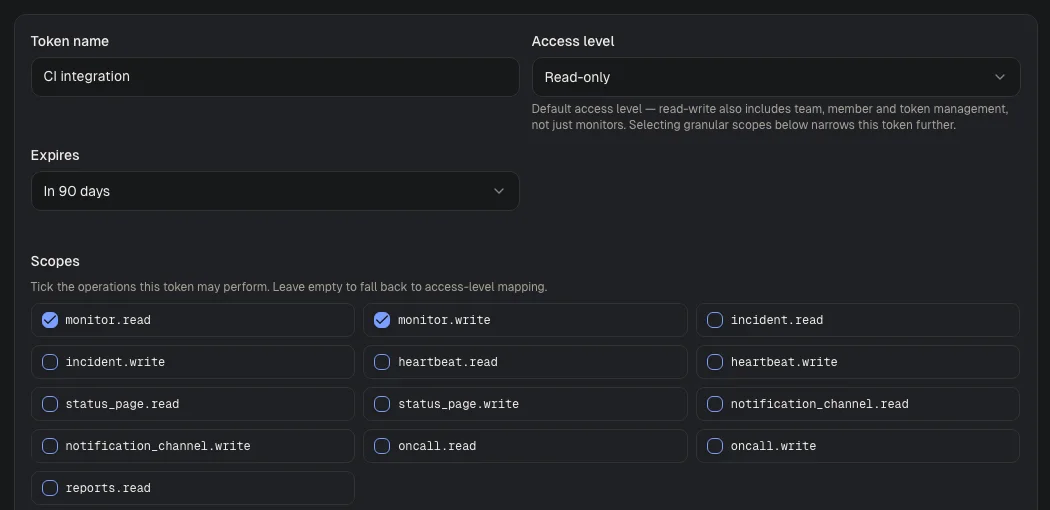
Visual guide · Settings / API tokens
- Token nameChoose a name that identifies the integration, such as CI integration.
- Access levelThe default for a token without explicit scopes. Read-only is the safe start. The screenshot shows the form before a token is created.
- ScopesSelect only the operations the integration needs. The example allows reading and writing monitors.
- The key is shown once. up4 stores only a SHA-256 hash, so a lost key cannot be shown again; create a new one.
- Every key starts with
pls_. - Without an explicit scope list, a read-only key gets every
.readscope and a read and write key gets every read, write and delete scope. - A key cannot create, rotate or revoke keys. Those routes answer only to a signed-in browser session.
- Rotate in the app issues a new key with the same name, scopes, access level, clients and expiry. The old key keeps working for at most 24 more hours, so you can switch over without downtime.
- up4 records when a key was last used.
Send the key
Put it in the Authorization header as a Bearer token. GET /me needs only self.read and shows what the key can do:
export UP4_API_KEY="pls_…"

curl -s https://app.upfour.io/v1/me \
  -H "Authorization: Bearer $UP4_API_KEY"
{
"data": {
"api_key_id": "…",
"api_version": "2026-05-07",
"auth_method": "api_key",
"client_set": { "All": true, "CompanyLevel": true, "IDs": null },
"org_id": "…",
"org_role": "owner",
"scopes": ["self.read", "monitor.read", "monitor.write", …],
"user_id": "…"
}
} scopes comes in no fixed order. A team key also shows
team_id. client_set is explained on the
client scope page.
Scopes
A scope is <resource>.read, .write or, for monitors,
.delete. Each reference page states the scope per operation; the table shows what the families cover.
| Read scope | Write scopes | Covers |
|---|---|---|
monitor.read | monitor.write, monitor.delete | Monitors and monitor groups. Write covers create, update, pause, resume, check now, bulk and batch changes; delete is its own scope. |
heartbeat.read | heartbeat.write | Scheduled jobs (heartbeats) and their groups. Deleting needs write. |
incident.read | incident.write | Incidents, severities and severity groups. |
status_page.read | status_page.write | Status pages, update templates and design templates. Subscriber changes need status_page.subscriber.write. |
notification_channel.read | notification_channel.write | Alert channels. |
escalation_policy.read | escalation_policy.write | Escalation policies. |
oncall.read | oncall.write | On-call schedules, rotations and overrides. |
runbook.read | runbook.write | Playbooks (runbooks). |
client.read | client.write | Clients and client templates. |
team.read | team.write | Teams. |
member.read | member.write | Company members and invites, and the members of a team. |
report.read | report.write | Reports, report schedules and share links, SLA policies and the advisor. |
webhook.read | webhook.write | Webhook subscriptions and their deliveries. |
metadata.read | metadata.write | Metadata on monitors, scheduled jobs, incidents and clients. |
organization.read | organization.write | Company settings: branding, security, SSO. |
audit_log.read | — | The audit log. |
self.read | — | GET /me, the key introspecting itself. |
You may also see api_key.read and api_key.write on a key.
No public route needs them.
A key that is read-only by access level is refused on every write route, even if its scope list contains a write scope. The role of the person who created the key applies as well: a viewer cannot write with a read and write key.
When the key is refused
| Status | error.code | error.message | Meaning |
|---|---|---|---|
| 401 | unauthorized | Invalid authorization header format | The header is present but is not Bearer followed by a token. The scheme is case-sensitive: write Bearer. |
| 401 | unauthorized | API key required | The token does not start with pls_. |
| 401 | unauthorized | Invalid API key | The key is unknown, revoked or expired, or its Company was deleted. |
| 401 | unauthorized | Session cookie required | There is no Authorization header at all, so the request is treated as a browser request. |
| 401 | unauthorized | Invalid organization | The person who created the key is no longer a member of the Company. |
| 403 | insufficient_scope | API token does not have the required scope | The key lacks the scope this route needs. details.required_scope names it. |
| 403 | insufficient_scope | API token cannot access this route | The route is not part of the public API. |
| 403 | read_only_api_key | Read-only API keys cannot use write permissions | The key has the read-only access level and the route needs a .write or .delete scope. |
| 403 | api_key_scopes_required | Legacy API key has no explicit scopes and must be rotated | An old key without a scope list. Rotate it in the app. |
| 403 | session_required | This route is available only to an authenticated browser session | The route belongs to the app: key management, billing, user settings, the dashboard. |
The shape of these bodies is on the responses page; every code is in the
error catalogue, for example insufficient_scope.
Company-level routes such as /organization answer
404 Not found to team keys and to keys that cannot read company-level resources.
Common mistakes
- Writing
bearerin lowercase, or leaving out the word. Both give401. - Reading
403as a bad key. A bad key is401;403means the key is valid but lacks the scope or the write access. - Creating a key as read-only and adding write scopes later in your head. Create a read and write key, or rotate to one.
- Keeping keys in shared chat or in code. Revoke a leaked key in the app; it stops working at once.
- Using a key tied to one person for an integration. When that person leaves the Company, the key answers
401.
Was this page helpful?