Deploys without false alarms.
A rolling restart that drops requests for eight seconds is not an outage — but a 10-second monitor can notice it. Pause around the deploy and the planned restart stays out of your alert history and your uptime numbers. Paused monitors also cost nothing.
The two calls
Set UP4_API_KEY and MONITOR_ID first.
curl -fsS -X POST "https://app.upfour.io/v1/monitors/$MONITOR_ID/pause" \
  -H "Authorization: Bearer $UP4_API_KEY"

# … deploy …

curl -fsS -X POST "https://app.upfour.io/v1/monitors/$MONITOR_ID/resume" \
  -H "Authorization: Bearer $UP4_API_KEY"
GitHub Actions
Store the key as a repository secret. if: always() on the
resume step matters — the monitor must come back even when the deploy fails (especially then):
name: deploy
on: { push: { branches: [main] } }

jobs:
  deploy:
    runs-on: ubuntu-latest
    env:
      UP4_API_KEY: ${{ secrets.UP4_API_KEY }}
      MONITOR_ID: 42ded714-482c-4c3e-b7f2-bcd2e7ece4f1
    steps:
      - uses: actions/checkout@v4

      - name: Pause monitoring
        run: |
          curl -fsS -X POST "https://app.upfour.io/v1/monitors/$MONITOR_ID/pause" \
            -H "Authorization: Bearer $UP4_API_KEY"

      - name: Deploy
        run: ./deploy.sh

      - name: Resume monitoring
        if: always()
        run: |
          curl -fsS -X POST "https://app.upfour.io/v1/monitors/$MONITOR_ID/resume" \
            -H "Authorization: Bearer $UP4_API_KEY"
Variants
A whole fleet: list the affected monitors first
(GET /monitors?q=…, following the cursor) and loop. Scheduled maintenance
instead: for recurring windows (nightly restarts), a
maintenance window on the monitor is
cleaner than pausing from CI. Scoped key: give CI a key with only
monitor.write — nothing else is reachable if the secret leaks.
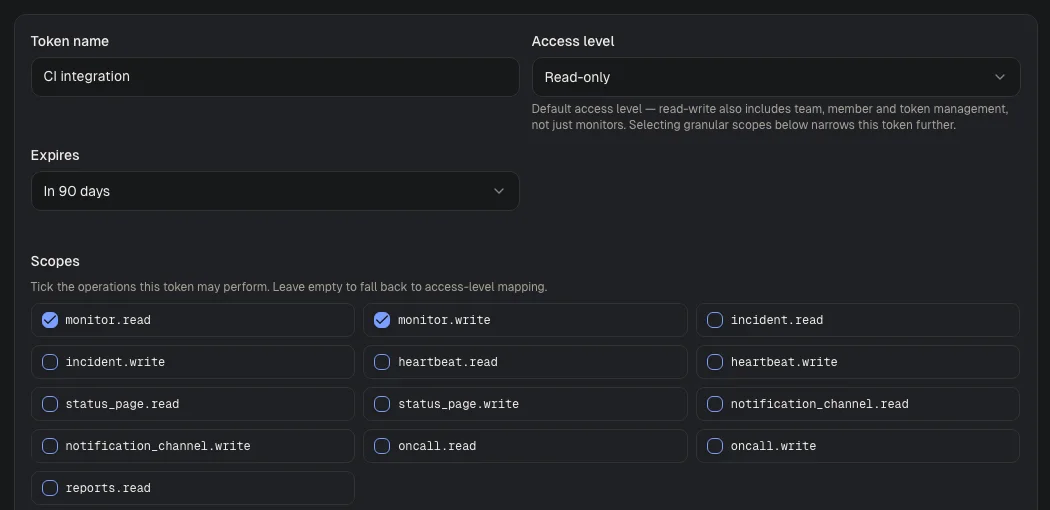
Visual guide · Settings / API tokens
- Token nameChoose a name that identifies the integration, such as CI integration.
- Access levelThe default for a token without explicit scopes. Read-only is the safe start. The screenshot shows the form before a token is created.
- ScopesSelect only the operations the integration needs. The example allows reading and writing monitors.
Was this page helpful?