The fleet lives in git.
Monitors that only exist in a dashboard drift: someone edits an interval, nobody knows why. Keep the fleet in a JSON file next to your infrastructure code and sync it from CI — reviewable, diffable, revertable.
The fleet file
Save it as monitors.json:
[
  { "name": "api",     "url": "https://api.example.com/health", "monitor_type": "http", "interval_seconds": 10, "regions": ["eu"] },
  { "name": "website", "url": "https://example.com",            "monitor_type": "http", "interval_seconds": 60, "regions": ["eu"] },
  { "name": "shop",    "url": "https://shop.example.com",       "monitor_type": "http", "interval_seconds": 30, "regions": ["eu"],
    "alert_type": "keyword", "keyword": "Add to cart" }
]
The sync script
Create-if-missing, keyed by name within one client (or at company level when an entry has no
client_id). The lookup uses the search parameter
(q=, a substring match, so the script compares names exactly),
URL-encodes the name and reads every page. Creation carries an idempotency key built from client
id and name, so parallel CI runs cannot double-create:
#!/usr/bin/env bash
set -euo pipefail
: "${UP4_API_KEY:?set UP4_API_KEY first}"
API=https://app.upfour.io/v1

# exists NAME [CLIENT_ID]: 0 = found, 1 = not found, 2 = lookup failed
exists() {
  local name=$1 client=${2:-} cursor="" page found more
  while :; do
    page=$(curl -fsS -G "$API/monitors" \
      -H "Authorization: Bearer $UP4_API_KEY" \
      --data-urlencode "q=$name" --data-urlencode "limit=250" \
      ${client:+--data-urlencode "client_id=$client"} \
      ${cursor:+--data-urlencode "cursor=$cursor"}) || return 2
    found=$(jq --arg n "$name" 'any((.data // [])[]; .name == $n)' <<<"$page") || return 2
    [ "$found" = true ] && return 0
    more=$(jq -r '.pagination.has_more // false' <<<"$page") || return 2
    [ "$more" = true ] || return 1
    cursor=$(jq -r '.pagination.next_cursor' <<<"$page") || return 2
  done
}

jq -c '.[]' monitors.json | while read -r monitor; do
  name=$(jq -r .name <<<"$monitor")
  client=$(jq -r '.client_id // empty' <<<"$monitor")
  rc=0; exists "$name" "$client" || rc=$?
  case $rc in
    0) echo "exists:  $name" ;;
    1)
      key=$(printf '%s|%s' "$client" "$name" | shasum | cut -c1-32)
      curl -fsS -X POST "$API/monitors" \
        -H "Authorization: Bearer $UP4_API_KEY" \
        -H "Content-Type: application/json" \
        -H "Idempotency-Key: fleet-$key" \
        -d "$monitor" > /dev/null
      echo "created: $name" ;;
    *) echo "lookup failed: $name" >&2; exit 1 ;;
  esac
done
A failed lookup stops the run instead of creating. The client id belongs in the key: with the name
alone, the same name in a second client would send a different body under the same key, and the
create is answered with 409 idempotency_key_conflict, not
treated as a duplicate. Keys are kept for 24 hours.
Updating and pruning
This recipe deliberately stops at create-if-missing — it can run against a fleet people also
touch by hand without ever overwriting their work. If the file should be the single source of
truth, extend the else-branch with a PUT /monitors/{id}
of the desired state, and treat monitors that exist remotely but not in the file as candidates
for deletion — behind a --prune flag you have to mean.
Notes
There is no test environment: try the script on a dedicated Client or a few throwaway monitors first
(testing). Give CI a key scoped to
monitor.read + monitor.write.
Agencies: add client_id to each entry; the script then
searches inside that client only. One file per client keeps the diffs small.
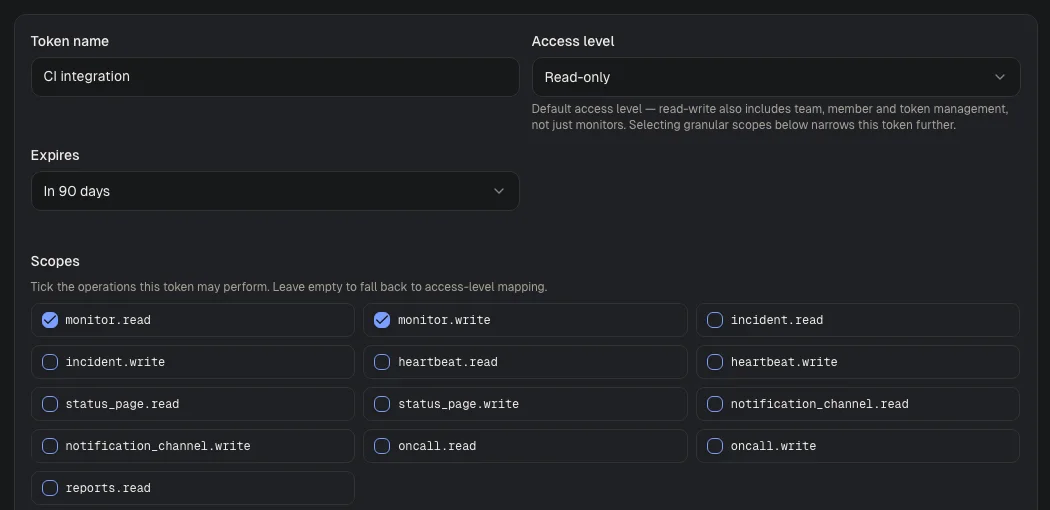
Visual guide · Settings / API tokens
- Token nameChoose a name that identifies the integration, such as CI integration.
- Access levelThe default for a token without explicit scopes. Read-only is the safe start. The screenshot shows the form before a token is created.
- ScopesSelect only the operations the integration needs. The example allows reading and writing monitors.
Was this page helpful?