Test without paging anyone.
up4 has no separate test environment. Every API key works on your real Company, and every check it creates runs for real and is billed like any other (€9 per million executions). You keep an experiment quiet and small with a narrow key, the silent switches and the dry-runs below.
One kind of key
API keys start with pls_; keys created earlier with the
pls_live_ prefix keep working. Create keys in the app
under Settings → API tokens. API keys cannot create other keys, so this step always
happens in the signed-in app. For an experiment, hand out as little as possible:
- Read-only access level, or only the scopes the experiment needs
(
monitor.read,incident.write, …). - A dedicated Client or Team. With agency mode, limit the key to one Client through
allowed_clientsand archive that Client when you are done. - A short expiry, 30 days or less.
export UP4_API_KEY="pls_…"

curl -s https://app.upfour.io/v1/me \
  -H "Authorization: Bearer $UP4_API_KEY"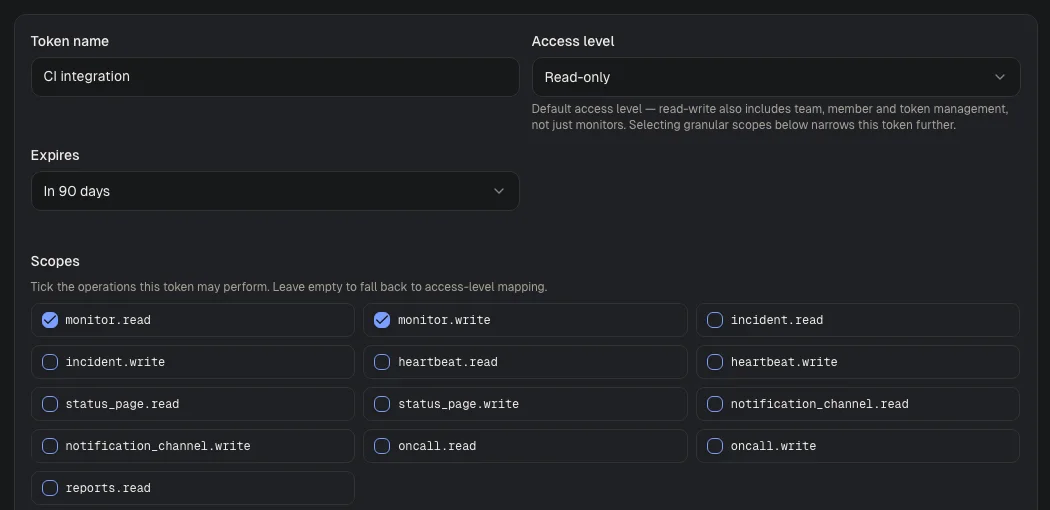
Visual guide · Settings / API tokens
- Token nameChoose a name that identifies the integration, such as CI integration.
- Access levelThe default for a token without explicit scopes. Read-only is the safe start. The screenshot shows the form before a token is created.
- ScopesSelect only the operations the integration needs. The example allows reading and writing monitors.
Stay quiet: notify: false
The calls that notify people on the side take an optional JSON field
notify (boolean, default true):
POST /incidents | The alert channels and the alert plan the new incident would trigger. |
POST or PUT /incidents/{id}/acknowledge | The notices for the acknowledgement. |
POST or PUT /incidents/{id}/resolve | The notices for the resolution. |
POST or PUT /incidents/{id}/reopen | The notices for the reopening. |
POST /incidents/{id}/comments | The notices for the comment. |
POST /incidents/{id}/updates | The notices for the update. |
With notify: false no alert channel (email, SMS, voice,
Slack, Teams, …) and no alert plan (escalation policy) is triggered. The live view in the app
and outbound API webhooks still
fire: webhooks are for systems, not people. Acknowledge, resolve and reopen take no body
otherwise; send {"notify": false} for the quiet version.
curl -s -X POST https://app.upfour.io/v1/incidents \
  -H "Authorization: Bearer $UP4_API_KEY" \
  -H "Content-Type: application/json" \
  -H "Idempotency-Key: $(uuidgen)" \
  -d '{"title": "Failover rehearsal", "notify": false}'
A request that contradicts itself is rejected with 400:
POST /incidents with notify: false
plus an escalation_policy_id or
notification_channel_ids asks for a quiet incident and for
notifications at once.
Preview before you apply
POST /monitors/batch/dry-run | Checks an import and returns a dry_run_id. Send the same body with that dry_run_id to POST /monitors/batch to apply it; if the resolved settings or the existing monitors changed in between, the apply answers 409 and creates nothing. With create_paused: true the monitors start paused, so no check runs until you resume them. Scope monitor.write. |
POST /client-templates/{templateID}/dry-run | Shows what applying a template to a Client would resolve and creates nothing. Scope client.write. |
GET /status-pages/{pageID}/mail-preview | Forecasts who would get mail for a status page entry. Scope status_page.read. |
Status pages: notify_subscribers
POST /status-pages/{pageID}/updates, its
/entries and
POST /status-pages/{pageID}/reports mail the matching
subscribers when notify_subscribers is
true. Set it to false to
publish without mailing anyone.
Where there is no silent switch
Calls whose purpose is to notify have no notify field: test
alerts, channel and alert-plan tests, escalation, invitations, report sending and the webhook test.
Point those at a channel that reaches only you.
Use it everywhere docs say “Try it”
The reference pages run requests straight
from your browser. Every request that is not a GET asks for
confirmation first, because every key changes real data. When you are done, pause or delete what
the experiment created: running checks cost money until you do.
Was this page helpful?